Veil AI
An assistant inside the terminal that explains order flow and the platform, reads your journal, interprets the VeilGEX map and drafts Studio code. It explains and drafts; it does not trade and does not advise.
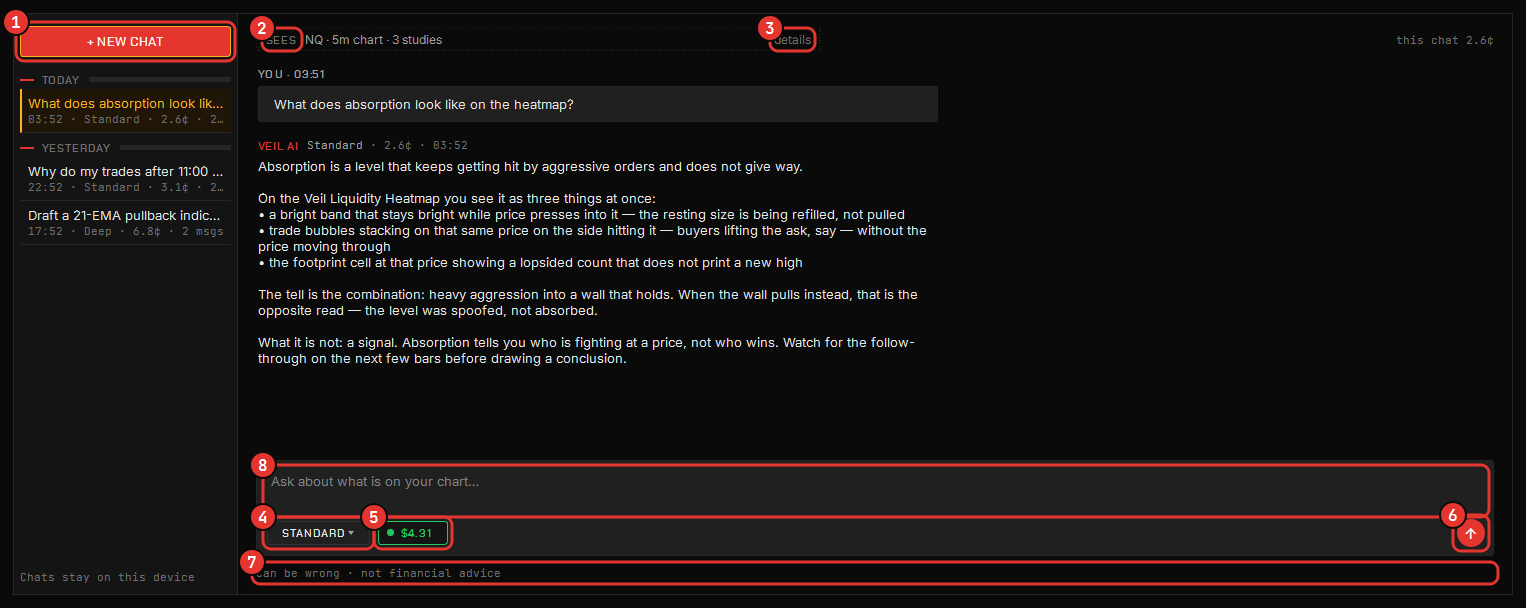
Veil AI lives next to the Studio, the journal and the VeilGEX map and answers in plain language about order flow, the platform, and what is on your screen.
What it does
- Explains order flow — delta, imbalance, absorption, the heatmap, footprints, profiles and dealer gamma — at the depth you ask for, with the platform’s own panels as the examples.
- Reads your journal — inside the journal it sees the statistics you have on screen and reads them like a coach: what the sample can show, and what it cannot yet.
- Interprets VeilGEX — docked in the VeilGEX window it is primed with the levels on screen.
- Drafts indicators and strategies — in the Studio it writes the code for what you describe and inserts it into your editor with one click. Your code, in the Studio’s sandbox; you run it, you save it.
What it will never do
It never places or changes an order, never changes a setting, never sees your passwords or licence key, and does not give trading advice. Ask it for a direction and it lays out the competing readings and what would confirm each — the decision stays yours. It has no way to reach your orders, your Risk Manager, your copier or your account; the only thing it can put into the platform is a code draft in the Studio editor, and only when you click to insert it.
It can be wrong. It is an assistant, not an authority — verify anything you would act on, and treat its reading of a chart as one more opinion at the desk.
Opening it
The Command Center’s Veil AI tile opens it in its own window; Ctrl+/ shows or hides the panel wherever it docks — the chart, the journal, the Studio, VeilGEX, the Veil Desk. Enter sends; Shift+Enter is a new line. Every conversation is saved on your computer, so you can pick any of them back up.
What it can see
Every panel it opens in carries a chip naming exactly what it is being told about your screen — the chart, the journal filter you are on, the GEX map — and the chip opens the block that gets sent. If the chip does not name it, it is not sent.
Four models
Pick the model per question: Quick for look-ups, Standard for everyday, Deep for code and full reviews, Max when you want the strongest answer. The cost of each reply is shown under it.
Cost and privacy
Usage is included in every plan and metered against a balance that resets each billing period; a typical Standard reply is a few cents. Run out and you can add balance from the Veil AI tab of your account on the site. Nothing is charged to your card unless you buy a pack or turn on auto-reload yourself. See Account & billing.
Your conversation history is saved on your computer only. To answer, the question and a small block of the numbers on the screen you are asking about are sent to Chartveil and on to our model provider. Your market-data credentials, passwords and licence key are never sent; the app removes anything that looks like one before it leaves. We keep a usage ledger — when, which tier, what it cost — because that is what your balance is made of, not the text. The privacy policy has the detail.