News & the economic calendar
Today, Week and Headlines on Chartveil's own economic calendar, a countdown to the next high-impact release, the 15-minute reaction beside every release that has printed, and spoken warnings if you want them.
The News pane and the Veil Economic Events study are driven by the same calendar. It works offline; nothing is extrapolated past what is published.
Opening it
From the Veil Desk’s + Add menu, from News in a chart header, from Open beside ▸ on a docked chart, or by clicking the countdown chip on a chart’s quote tape.
The three views
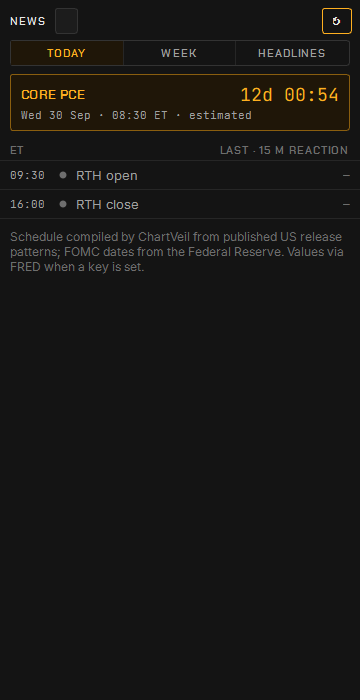
- Today lists the day’s scheduled releases with a countdown to the next high-impact one and, once a release has printed, the market’s fifteen-minute reaction in points beside it.
- Week is the calendar ahead. A confirmed date draws solid; an estimated one draws dashed with a ?.
- Headlines is an opt-in feed of public wires — off until you switch it on under Chart settings → Data.
Release chips
Inside the last hour before a high-impact release the quote tape, the Time & Sales header and the ladder header carry a release chip with the countdown, so the number is in front of you wherever you are looking.
Spoken warnings
Five- and one-minute warnings, spoken through the same voice as the order sounds, are under Chart settings → Sounds. They are off by default.
Data settings
Chart settings → Data holds two opt-ins:
- a free statistics key so past markers and releases also carry the actual and previous prints as they were first published;
- the headline feeds behind the Headlines view.
Neither is needed for the schedule itself.