Exits, sizing & sounds
A saved exit plan that every entry carries, sizing by what the trade may lose, and hearing what your orders did.
Automated exits — the Advanced strategy
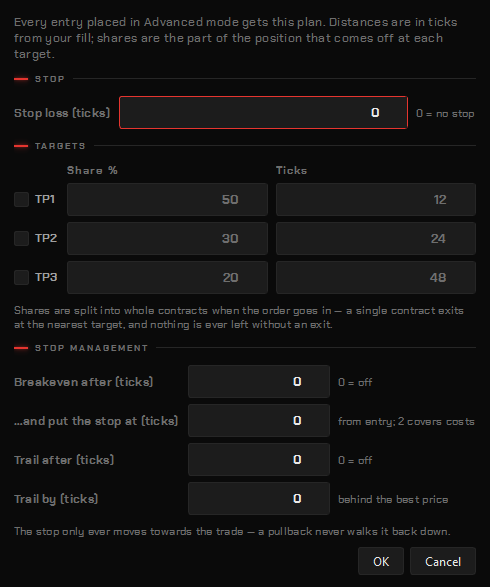
Switch the ticket to Advanced mode and every entry is wrapped in one saved plan:
- a stop, in ticks from the entry;
- up to three targets, each with a share of the entry size — the shares are percentages, normalised to whole contracts when the order goes in, so a plan written once works whether the trade is one contract or ten;
- stop management: the stop resizes as targets fill, moves to breakeven after a set gain, and a trailing stop that only ever moves toward the trade.
Everything is in ticks from the entry, because that is how a trade gets planned out loud — stop eight, first target twelve — and it then applies unchanged to any contract. Edit it with Edit strategy… on the ticket; the plan is shared by every ticket and saved with your config. Build it once, and every entry carries it.
Sizing by risk
Risk mode turns the question around: you say what the trade may lose, in dollars, click the stop level on the chart, and the size is computed from the distance at the traded contract’s point value. It always rounds down — if even one contract busts the number, it places nothing and says so.
Order sounds
The platform can say what happened to an order — spoken aloud, as a chime, or with sound files of your own — so you can watch the tape instead of the ladder. Set it under right-click → Chart settings… → Sounds. Nothing to install; it uses the voice already in Windows.
| Event | On by default |
|---|---|
| Order filled | yes |
| Partial fill | no |
| Order submitted | no |
| Order modified | no |
| Order cancelled | yes |
| Order rejected | yes |
| Stop-loss filled | yes |
| Target filled | yes |
| Position flat | yes |
| Position reversed | no |
| Trading locked | yes |
Each event is its own switch; the chatty ones are off by default. The copier’s refusals, orphans and locks, the GEX wall and flip crossings, and alerts have their own rows. Three ways to say it: Voice (the Windows speech engine, pick the voice and the rate), Chime (rising for a fill or a target, falling for a cancel or a stop, a low double for a rejection), or My files (your own .wav files in a folder, named for the event — filled.wav, rejected.wav…). You can limit sounds to live accounts only or the simulator only.
Historical orders on the chart
Right-click → Historical orders draws every closed trade from the journal on the bars it happened on; History settings… picks the account, the reach-back in days and the exit label. See Charts.