Trade Copier
Trade one account and the others you own follow — in copy groups, sized per follower, with exits that fit what each follower actually holds and a kill switch you have to hold.
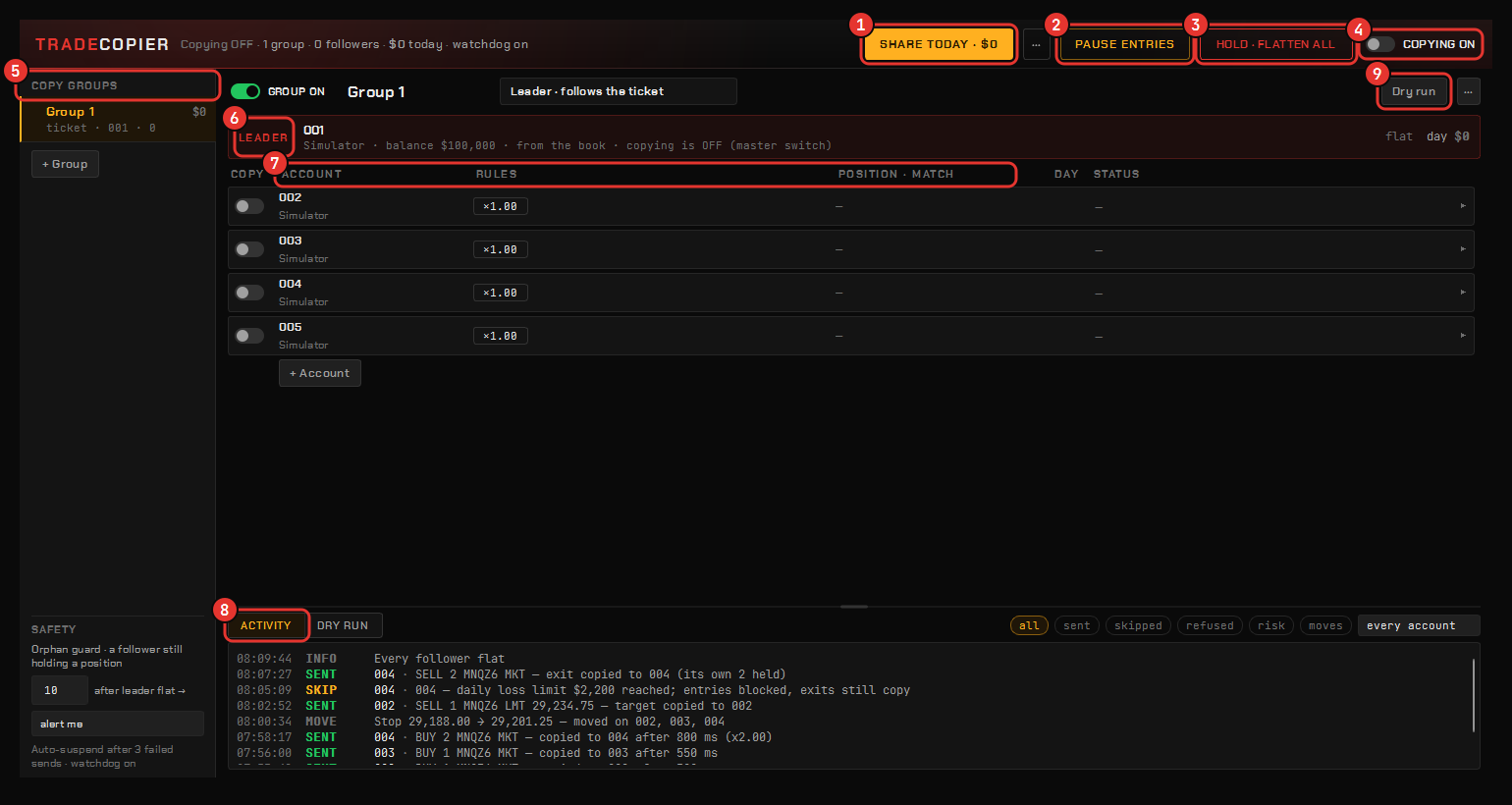
The copier mirrors one account’s orders across the rest, for traders running several funded accounts at once. It mirrors between accounts you own; copying to third parties is a regulated activity and is not what this is for. Simulated accounts work on either side, so the whole leader-and-followers arrangement can be rehearsed without an order leaving the machine.
Open it from the Command Center’s Trade copier tile or as a tile on the Veil Desk.
How it reads
Top-down:
- The band says the copier’s state in one sentence — how many groups, how many followers, what is paused — with Share today, Pause entries and the hold-to-flatten kill switch pinned where it can never be clipped.
- The group rail — your copy groups; each is on or off under one master switch.
- The leader on its own line — the account the ticket is on, or one you pin.
- One row per follower, carrying its rules as chips and whether its position matches the leader’s. Click a row to edit it, risk included.
- The activity feed — every mirrored order as it happens, with the reason when one is skipped; it exports to CSV.
Copy groups
Each group has its own leader, its own followers, sizing and rules. Every enabled group leads at once, and copies never cascade — a follower is never a leader for someone else’s group. Groups can be renamed, duplicated in one click and deleted. A group can copy only the markets you name.
Sizing per follower
| Mode | The follower trades |
|---|---|
| Multiplier | The leader’s size × a factor |
| Fixed size | The same number of contracts every time |
| Same money | The same dollar exposure, mapped across minis and micros — Trade as minis or micros |
A cap per order and a cap per position bound entries, never exits.
Exits fit the follower
An exit closes what the follower actually holds, not a blind copy of the leader’s size — accounts that drifted apart still come out flat. A follower added mid-position can catch up to the leader instead of waiting for the next trade.
Risk per follower
Each follower carries its own book: a daily loss lock, a profit lock, a trade cap, a session window and a flat-by time, plus a max slip and an optional delay. A lock blocks new entries only; exits, cancels and flattens always copy. Apply to all gives every other follower in the group the same rules.
Safety
- Dry run reports what would have copied without sending anything. Use it before a real account joins.
- The flatten buttons have to be held down rather than clicked: HOLD · FLATTEN on one account, Flatten followers for the followers only, and HOLD · FLATTEN ALL — the panic door — which cancels every order and closes every broker-reported position on every account in the group, leaders included, and switches copying off afterwards. It is never greyed.
- Pause entries keeps exits copying while nothing new goes in.
- A copy that fails is logged with the reason; after three consecutive failures the account is suspended from new entries until you re-save it, and exits are still attempted.
- The orphan guard can warn you, or flatten a follower, that is holding a position while every leader it follows is flat.
- If the leader sends something the group cannot mirror, the row says so.
Share the day
Share today renders a recap card summing the day across every account in the group as one image, marked as simulated when the accounts were. Nothing is uploaded; the card is a file on your machine.