Troubleshooting
When something looks wrong — the feed, the licence, an empty panel, a slow desk — and how to report a bug usefully.
Windows warned me about the installer
Expected. The installer is not code-signed yet, so SmartScreen shows Windows protected your PC the first time it runs. Click More info, then Run anyway — only for an installer you downloaded from your own dashboard. Some antivirus products quarantine unsigned installers on the same grounds; restore the file and allow it, or download again after adding an exception.
It says I must update before it will open
That is the build check: the terminal only runs a build we currently serve. Press Install — it downloads the current build, installs it and reopens; your settings, workspaces and journal are untouched. If the download will not start, take the installer from the dashboard.
My licence key is refused, or the seat is in use
Refused: the key and the email must be the pair shown on your dashboard, the subscription must be active, and the machine needs to reach the internet for the check — a firewall that blocks the terminal blocks activation too. A subscription whose last payment failed is inactive until the card is updated.
Seat in use: a copy is open on another of your machines — one at a time on monthly, two on annual. The dialog names the machine and offers to take the seat over in one click. If it names a machine you do not recognise, tell us straight away.
My feed login is refused
Work down this list — it is nearly always one of the first three:
- Wrong credentials. The dialog wants the Rithmic data login your firm issued, which is usually different from the login for the firm’s own website.
- Wrong server. Pick your firm by name in the server list. A funded login on the paper-trading server, or the other way round, is refused.
- Maintenance break. Between 17:00 and 18:00 ET the exchange is closed and the chip reads connecting… — wait for the reopen.
- The login itself. An evaluation that ended, an account the firm closed, or data fees unpaid all switch the credentials off at their end. Sign in to your firm’s dashboard and confirm the data subscription is active.
My depth panels are empty but charts work
The signature of missing Level 2. Time-and-sales is arriving (so bars and footprints build) but order-book data is not. Ask your prop firm or broker to add Level 2 to your account — and if it is only the gold, silver or Dow panels that are empty, ask for COMEX or CBOT Level 2 specifically. The heatmap’s instrument menu says no depth beside a market the entitlement does not cover.
A chart says “No chart data”
In order of likelihood: the feed is not connected (check the chip in the Command Center); it is the maintenance break; or the contract month you opened has expired and the provider refuses history for it — open the front month. If the feed is up and the contract is live, right-click → Reload chart. Still blank? Send a problem report.
A chart has a hole in it, or a bar that looks wrong
Right-click → Reload chart. The history is requested again and the bars are overwritten in place — drawings, view and scale kept. If the hole comes back, note the time window and send it over.
There are gaps in the book
Almost always the connection. Market-by-order is a heavy stream and wireless links drop packets under load. Move to a wired connection before investigating anything else.
The feed disconnected mid-session
The client reconnects and resumes tick paging automatically, backfilling what it missed. If a hole remains after reconnecting, note the time window and send it over.
The terminal feels slow
Check how many heatmap windows are open — each one is decoding depth. 8 to 16 GB is the recommendation, toward 16 GB for running several alongside charts. Turn down the number of profiles shown on a heavy chart. If it is slow with one window on a machine that meets the requirements, tell us, because that is a bug.
Prices on the scale look wrong
Every price should be a multiple of the instrument’s tick. A value ending in an impossible fraction is a display fault worth reporting with a screenshot.
A study of mine stopped drawing
A custom indicator that fails three times is paused, and one that measures over 25 ms a bar runs on a worker. Open it in the Studio, Validate, and read the cost line.
Reporting a problem
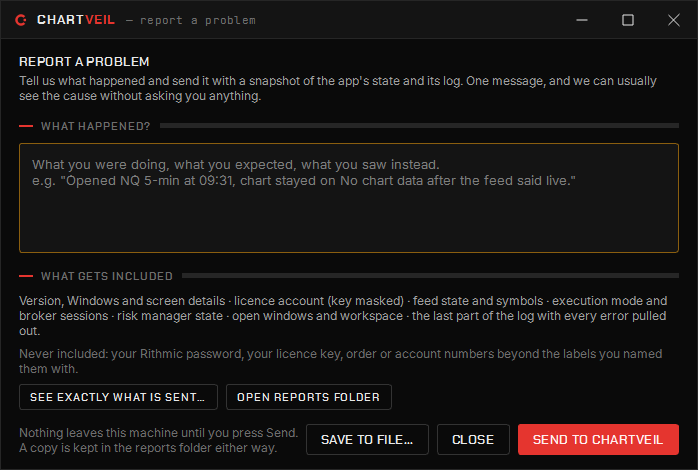
From the Command Center, Help → Report a problem… builds a snapshot — version, feed, accounts, open windows and every error in the log — with a note from you. Save it as a file or send it to us; the preview shows byte for byte what leaves, the licence key is masked and passwords are never included.
Writing in instead? Include which panel, which instrument, what you had just done, your OS version, and how many windows were open. “It crashed” costs a round trip.
Never send your feed password. We will never ask for it.