Accounts & the simulator
Broker accounts read back from your firm; simulated accounts that carry a funded program's rule book so you can rehearse the exact account you plan to trade.
Chartveil trades two kinds of account, and the ticket always says which:
- A broker account — orders route to your own firm through your own credentials, and positions and P&L read back from the firm, so the platform shows the same numbers your account does.
- A simulated account — fills come from the built-in simulator: real prices, simulated fills, for practising execution and running prop-style rules without real risk. Every simulated account carries “Sim” in its name on purpose, so a screenshot of a ticket can never pass as a funded result.
Chartveil is the interface, not the counterparty. It is not a broker, holds no funds, and every order sent from your account is yours.
Broker accounts
They arrive with the feed login: connect, and the accounts your firm has put on that login appear in the Command Center’s Accounts tab and on the ticket’s account menu. There is nothing to add by hand. The account number is what the broker calls the account; passwords live in the sealed connection store and are never asked for here.
Confirm with your firm that trading through a third-party platform is allowed on the account you mean to use, and especially before placing live orders on a funded account with platform restrictions. Their rules, not ours, decide.
Simulated accounts
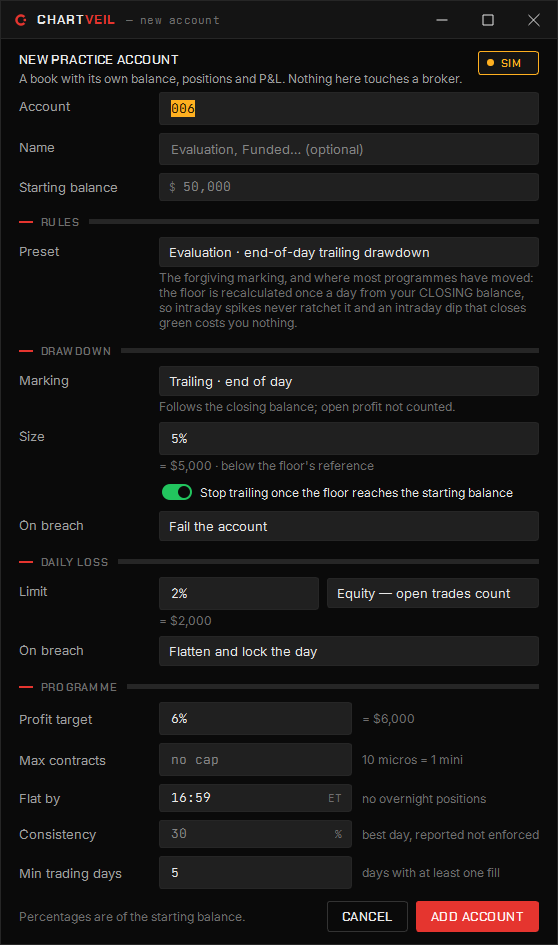
Accounts → Add account creates one. Give it a starting balance and, if you want, a rule book:
| Preset | Shape |
|---|---|
| No rules | A plain practice account. Nothing is enforced. |
| Evaluation · intraday trailing drawdown | The strict marking: the floor follows your peak equity including open profit, tick by tick, and keeps whatever ground it takes. |
| Evaluation · end-of-day trailing drawdown | The forgiving marking: the floor is recalculated once a day from your closing balance, so an intraday dip that closes green costs nothing. |
| Funded · static drawdown + consistency | A fixed floor that never trails, no profit target, and a payout gate — no single day may be more than a set share of total profit. |
Every number stays editable, because the only figures that matter are the ones on your own firm’s dashboard. Any amount can be typed as dollars (2500) or as a share of the account (5%); the hint under the field shows the other unit live.
The rules an account can carry:
- Drawdown — the floor, how it is marked (intraday trailing, end-of-day trailing, or static), whether it locks once it reaches the starting balance, and what happens on breach: fail the account.
- Daily loss — on equity or on realised only, and on breach flatten and lock the day.
- Profit target, max contracts, flat by time, consistency (reported, never enforced — it delays a payout, it does not close an account) and minimum trading days.
Breach a rule and the account locks or fails exactly as the real program would; hit the target and it tells you. The simulator runs the same ticket, the same chart trading and the same Risk Manager on live prices, so the first time you drag a stop is not with money behind it.
Which account is the ticket on
The account menu on the ticket picks it, per chart. The trade chip in the chart header names it; a live account puts a red edge on the strip and asks for one confirmation per window before the first order leaves. A docked ladder trades through its chart’s ticket.
Several accounts at once
Run several accounts side by side, each with its own book and its own rule set. The Trade Copier mirrors one onto the others; the journal can combine any set of them into one record. The Risk Manager is one rule book over all of them.